
Pure-Swift tunnel
OmniLink+’s own Network Extension drives the Packet Tunnel. Encrypted transport stays on device in Swift.
Tunnel detailsOmniLink+ for iPhone
Encrypted sessions run inside OmniLink+’s own Packet Tunnel extension. The tunnel stack, plan desk and two-board workbench are designed as one OmniLink+ product.
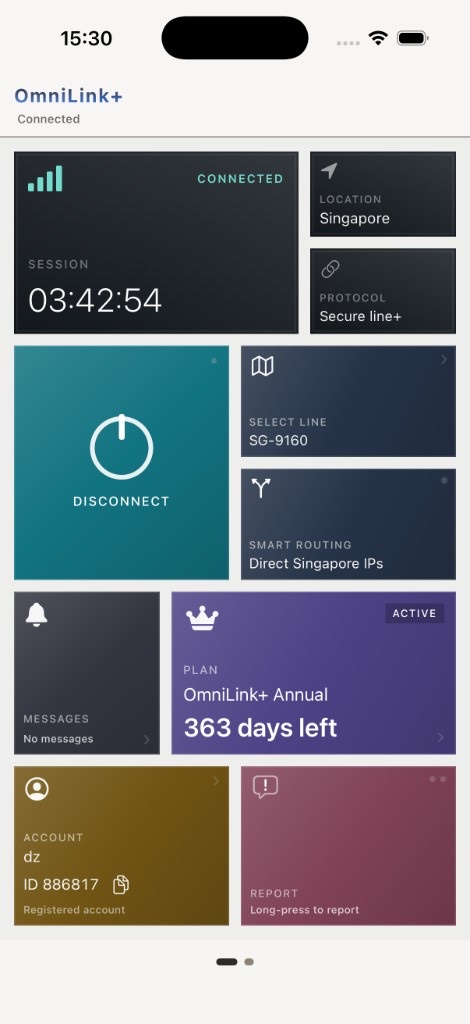
Connection and service, together
OmniLink+ brings an on-device Pure-Swift Packet Tunnel, live endpoint selection, smart routing, App Store duration plans, notices, care tickets and network diagnostics into one native iPhone workbench.
Five core capabilities
Each capability below is part of the current iPhone client. Regions, endpoint availability and plan offers remain live values inside the app.
OmniLink+’s own Network Extension drives the Packet Tunnel. Encrypted transport stays on device in Swift.
Tunnel detailsConnect handles endpoint selection and session control. Tools brings together the account, plans, messages, care and diagnostics.
Connect and ToolsNames, regions, line classes and reachability arrive from the service. Incompatible entries are disabled with a reason, and the directory can be refreshed manually.
Endpoint selectionSwitch between Smart Routing and Global Proxy. Smart Routing uses region awareness and on-device DNS mapping to keep local-region traffic direct.
Routing modesUnlock the tunnel desk for the duration shown before purchase. Restore eligible purchases and use notices, care tickets and path or latency diagnostics inside OmniLink+.
See plansPlans and access
OmniLink+ commonly offers monthly, quarterly, half-year and yearly access. The exact products, prices and renewal type are those displayed by Apple and the in-app Plans desk.
How to use OmniLink+
Sign in with a username and password. Purchase a plan to unlock member lines.
Create an account with a username and password, then sign in.
Browse the live directory by region and line class, review compatibility, then choose the path you want.
Choose Smart Routing or Global Proxy and start the session through OmniLink+’s own Network Extension.
Connection and service together
OmniLink+ brings connection, plans and support into one iPhone app.
When OmniLink+ fits
The service is intended for people who want a managed on-device tunnel and operational tools with a managed line list.
Run encrypted sessions on iPhone through a tunnel implementation owned by OmniLink+.
Move from live line selection to connection and routing.
Review the current duration and terms before confirming, with Restore Purchases available.
Read notices, submit tickets and collect basic path or latency information without leaving the app.
Privacy and security